

I started my first blog with enthusiasm and a laundry list of excuses for why people weren't sticking around—turns out it wasn't the content, it was the experience. Here’s a practical, punchy guide to the WordPress plugins that actually keep readers on your site (without resorting to clickbait or sacrificial SEO sacrifices). ⏱️ 6-min read
Why Your Blog Needs to Be a Five-Star Hotel (Not a Motel 6)
Think of your blog like a hotel: do you want visitors checking in and staying the weekend, or sneaking out at 2 a.m. because the Wi-Fi is terrible and the drapes scream "last renovation: 1998"? A clean, fast, and trustworthy site improves user engagement, search rankings, and yes—your chances of making money without annoying everyone. I learned this the hard way: I had a post that ranked well but had a bounce rate so high it could qualify for a roller coaster.
Key reasons to prioritize UX:
- Lower bounce rate = more time for readers to fall in love with your voice.
- Better UX signals to search engines (Google rewards sites people use).
- Happier users are likelier to subscribe, share, and become repeat visitors.
Next stop: make that hotel sprint instead of limp to the lobby.
Speed Freaks Unite! Making Your Site Faster Than a Cheetah on Espresso
Slow sites lose readers faster than a dropped ice cream cone on a hot day. If your pages take more than a couple seconds, people bail. I once trimmed image sizes and watched session duration climb like a caffeinated mountain goat—no mystery, just less waiting.
- LiteSpeed Cache or WP Rocket — page caching, minification, and CDN integration to shave seconds off load times.
- Smush or ShortPixel — automatic image compression so your photos don’t behave like that one huge file that crashes the party.
- Consider a CDN (many caching plugins integrate one) to deliver content fast, globally.
Because nothing says "leave" like watching a spinner for ten seconds—speed is your first impression hero. Want to test before/after? Use Google PageSpeed Insights to see where your site stands and measure improvements.
Navigate This! Helping Readers Find Their Happy Place
A confused reader is an exited reader. Make navigation intuitive or be prepared to host tumbleweeds. I added a table of contents to long posts once and my pageviews per session quietly doubled while I watched Netflix. Coincidence? I think not.
- LuckyWP Table of Contents — auto-generates clear, clickable TOCs so readers jump to what they want without drama.
- YARPP (Yet Another Related Posts Plugin) — serves relevant older posts to keep people clicking instead of quitting.
- Menu plugins / mega menus (if you have lots of sections) make exploration less like doing a crossword puzzle.
Good navigation makes your blog feel like a guided museum tour instead of a scavenger hunt. From speed to navigation, everything’s building toward engagement—so let’s get people talking.
Don't Just Scroll By: Plugins for High-Fives and Conversations
Your blog should be a conversation, not a monologue. Comments and social sharing turn passing visitors into participants. I once replied to a thoughtful comment within 24 hours and it turned into a regular reader—it's amazing what a little human interaction will do.
- Disqus or enhanced native comments (with plugins like wpDiscuz) — better threads, notifications, and moderation options.
- SharedCounts or Social Warfare — fast, attractive share buttons that don’t slow your site down.
Think of comments and shares as digital high-fives; encourage them and people will feel seen. Up next: how to lock down your place so your guests don’t find a broken door.
Building Your Fan Club: The Art of Getting Them to Stick Around
Subscribers are the VIP list of your blog—email still outperforms social platforms for retention. I used a simple Mailchimp popup and watched a trickle of email signups grow into a steady stream of loyal readers who actually open my messages (novel concept, I know).
- Mailchimp for WordPress — easy opt-ins, integrations, and audience management so readers become loyal subscribers.
- WPForms — simple contact and feedback forms that make it painless for readers to tell you what they want.
- Use exit-intent forms, inline CTAs, and low-friction welcome offers to increase conversions.
Turning casual visitors into subscribers is like getting someone’s number after a great conversation—be straightforward, helpful, and don’t be spammy. Once you’ve got fans, protect them.
Fortress WordPress: Protecting Your Digital Dream Home
A hacked blog is the fastest way to lose readers and your sanity. I learned to sleep better after installing a solid security plugin—fewer midnight panic emails equals better focus on content creation.
- Wordfence or iThemes Security — firewalls, malware scanning, and login protection to keep trouble at bay.
- UpdraftPlus — reliable backups so if (when) something goes wrong, you’re not starting over from scratch.
Security and backups are like insurance and duct tape: boring until you need them, then priceless. Now that your site won’t explode, let’s automate content so you actually have something to keep readers coming back for.
Content King (or Queen): The Never-Ending Story, Made Easy
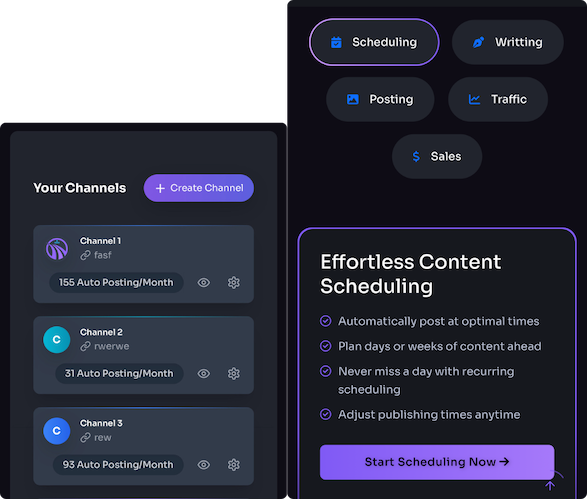
Fresh content is the retention currency. But writing, optimizing, and promoting takes time—unless you use tools to streamline the heavy lifting. I used a content workflow tool to batch-create and schedule posts, which saved me late-night panic-writing and the inevitable typos that make you cringe.
- Trafficontent — automates ideation, SEO copy and image generation, and social scheduling so you can publish consistently without burning out.
- Combine automation with an editorial calendar plugin to stay on a reliable schedule readers can trust.
Consistency beats occasional brilliance. Give readers new reasons to return and they’ll start treating your blog like part of their routine—no syrup required.
Playing Detective: Uncovering What Your Readers *Really* Want
Stop guessing and start checking the data. Analytics tell you what's resonating and what's making readers flee. I once followed MonsterInsights reports to find one underrated post that everyone loved—turns out I had a mini-series on a niche topic that deserved a sequel.
- MonsterInsights — brings Google Analytics insights into your WordPress dashboard so you can see what content hooks readers.
- Use heatmaps and funnel data where possible to visualize how people move through your site.
Think of analytics as your blog’s detective agency—use the clues to plan smarter content, better CTAs, and more sticky pages.
Wrapping up: focus on speed, navigation, conversation, subscriptions, security, consistent content, and data. Install sensible plugins, test changes, and iterate—your blog will stop being a one-night stand and start building real relationships with readers. For tools and deeper tests, check Google PageSpeed Insights, the WordPress Plugin Directory, and security best practices from Wordfence.
References: Google PageSpeed Insights, WordPress Plugin Directory, Wordfence
Powered by Trafficontent